Grief Guide
How to link a memorial song to a QR code on a headstone
Set up a QR code headstone memorial song with a stable tribute page. Check visitor playback, get cemetery permission, and test the code before installation.
Instead of sending relatives a song link whenever they visit, connect a headstone QR code to a lasting memorial page where they can choose to listen. The safest setup keeps the page address unchanged, tests the song on a visitor’s phone, and gets cemetery approval before anything is attached or engraved.
- For a QR code headstone memorial song, link to an editable memorial page rather than a temporary audio link.
- Rememberme creates custom memorial songs from personal memories; arrange QR hosting and headstone installation separately.
- Get cemetery permission before attaching a plaque or changing a headstone.
- Test the finished QR code on two phones, signed out, before installation.
Why this matters
A memorial song can hold familiar details: a phrase your father used, the way your sister laughed, or the routines you shared with a beloved pet. A QR code gives visitors a way to hear those memories without needing someone to send the link each time.
Rememberme is best for families seeking a custom memorial song built from personal memories and stories. The song is one part of this project. You still need a listening destination, a working QR code, and permission for the physical installation.
For a headstone project in 2026, permanence means more than a durable plaque. The code, web address, audio file, and account access all need care. A readable code cannot play a song if the page behind it has disappeared.
Keep the permanent address separate from the replaceable audio file. That lets you move or update the recording without changing the code on the stone.
Before you start
- Gather the song and hosting access. Have the finished audio, permission to share it, and access to a memorial page or website you can maintain. Rememberme produces custom memorial songs, but do not assume the song service also provides permanent QR hosting or cemetery installation.
- Get installation approval. Ask the cemetery and monument professional whether a QR plaque or engraving is permitted, where it can go, and who can install it. Also agree with the family on which memories can be shared publicly.
- Check the hidden access problem. A link that plays while you are signed in can fail for visitors. Open the exact destination in a private browser window before ordering anything permanent. Avoid temporary download links and addresses that require your account login.
You do not need to finish everything at once. First settle the destination and permissions; the physical code comes later.
Choose the listening destination
Compare the link arrangements
For most families, a static QR code pointing to an editable memorial page is the best starting point. The code contains the page address, while the page holds the song player and any supporting memories.
A static code cannot change its encoded address. A dynamic code usually sends visitors through a provider-controlled redirect whose destination you can edit. That flexibility adds another service to maintain.
| Arrangement | Best for | Advantage | Limitation |
|---|---|---|---|
| Static QR to an editable memorial page | Families maintaining one lasting tribute | You can replace the audio on the page without replacing the code | The page must keep its original address |
| Dynamic QR through a redirect provider | Families needing to change destination addresses | You can redirect the existing code to another page | Continued operation depends on the redirect provider and its terms |
| Static QR directly to an audio file | A simple listening link with a stable file address | Visitors go straight to the recording | Moving or deleting that file breaks the destination; playback varies by browser |
No arrangement guarantees permanent access. An editable page gives you room to maintain the tribute, but someone still needs to look after it.
Prepare the page
- Choose a destination you can maintain. Use a memorial page or website account with clear ownership. Ask how you can preserve the page address if the audio host changes.
- Add the finished song. Use the page’s supported audio player or a clearly identified listening link. If you need help with that part, follow the guide to adding a memorial song to an online tribute page.
- Write a brief introduction. Name the person or pet being remembered and explain what visitors will hear. Keep sensitive family details out unless everyone involved has agreed to share them.
- Make listening a choice. Use a player visitors start themselves rather than relying on automatic playback. Browsers restrict audible autoplay, and visitors deserve control over when the music begins.
- Test visitor access. Open the page while signed out. Confirm that the song plays without access to the owner’s account.
Expected result: the page opens for an intended visitor, identifies the tribute, and offers a clear way to start the song.
For a page created in 2026, record who owns the account and who will maintain it. Keep recovery information secure rather than putting it on the public tribute page.
Create the QR artwork
A QR code holds information, usually a web address for this workflow. It does not contain the memorial song itself. Scanning opens the destination; listening then depends on the website and the visitor’s internet connection.
Because no QR generator or memorial-page platform is required here, interface labels differ. Follow the actual address-entry and export controls in your chosen tool rather than assuming every service uses the same buttons.
- Copy the published page address. Take it from the visitor-facing page, not an editing dashboard or a preview. Open that copied address separately to confirm it reaches the right tribute.
- Choose the code arrangement. For the recommended static-page workflow, create a code that encodes the page address directly. If you choose a dynamic service, confirm who controls the redirect and how continued access works.
- Keep the design plain. Use dark code elements against a light background. Avoid photographs, decorative overlays, or a logo covering the code.
- Preserve the quiet zone. A standard QR code needs a clear border at least 4 modules wide on each side. A module is one small square in the code’s grid; do not let a plaque frame, inscription, or crop remove that border.
- Export suitable artwork. Ask the monument professional which file format is required. Keep the original export rather than sending a screenshot or a compressed messaging-app image.
- Save the destination with the artwork. Store a written record of the encoded address so another family member can verify it later.
Expected result: scanning the exported code opens the exact published memorial page, not a login screen or an unrelated preview.
A short, stable address can produce a less dense code than a long address containing tracking parameters. Do not remove address components blindly, though. Test any simplified address before generating the final artwork.
Test the proof and arrange installation
The important test is not whether a large code scans on your computer screen. It is whether a visitor can scan the physical version in the setting where it will be used.
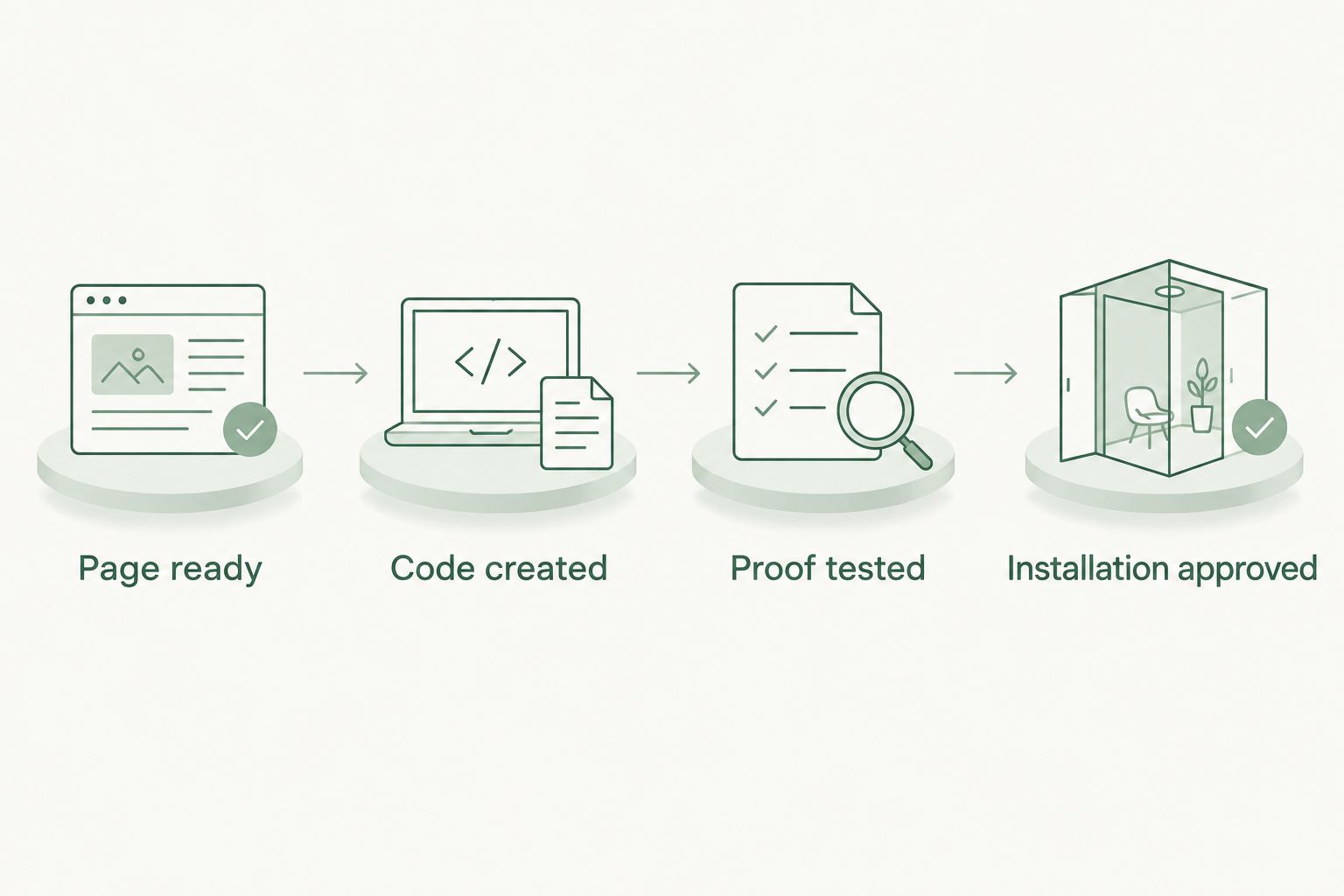
Follow this sequence before approving permanent work: Page ready, Code created, Proof tested, Installation approved. Keep that order even when you feel eager to finish the tribute.
- Print 1 proof at the intended size. Include the surrounding border and any nearby wording. A successful scan of an enlarged screen image does not verify the final layout.
- Test with 2 phones. Use different phones if possible, including one belonging to someone who has never opened the tribute. On an iPhone, open Camera, frame the code, and tap the link that appears. On other phones, use the built-in QR scanning function where supported.
- Test signed-out playback. Check the full journey: scan, open the page, start the song, and hear audio. Test over mobile data as well as your home connection.
- Check the location. With cemetery permission, assess reception, glare, placement, and whether a visitor can hold a phone comfortably in front of the proposed code.
- Review the production proof. Confirm the encoded destination, contrast, clear border, and placement with the monument professional. Ask them to select an appropriate size and process for the material.
- Have authorized professionals install it. Do not drill, glue, engrave, or apply chemicals to a headstone yourself. Follow the cemetery’s requirements and the monument professional’s installation instructions.
Expected result: the approved physical proof scans reliably during your tests, and the song plays for a visitor without owner access.
For installation in 2026, keep the approval and final artwork with the family’s memorial records. After installation, repeat the scan-and-listen test at the actual headstone.
Update the song without replacing the code
An adjacent workflow is adding a revised song, another recording, or a written tribute after the headstone code is already installed. You can do this without changing the code when the original memorial-page address remains unchanged.
- Open the existing page for editing. Confirm that you are editing the page already encoded in the installed QR code, not creating a replacement page with a new address.
- Replace or supplement the audio. Keep a backup of the previous recording before making changes. Give additional recordings clear titles so visitors can choose what to hear.
- Save the page without changing its address. Check that any publication or privacy changes have not made the tribute inaccessible.
- Scan the installed code again. Verify that visitors reach the updated page and can play the intended recording.
Expected result: the same physical code opens the same page address, with the updated tribute available there.
A direct-to-file code does not offer the same flexibility unless you can preserve that exact file address. A dynamic code can point elsewhere, but changes must be made through its redirect service.
If you revise the tribute during 2026, note the change in the family’s private maintenance record. Visitors do not need an administrative history, but the next account caretaker does.
Troubleshooting
The code does not scan
Check for glare, poor contrast, damage, a cropped quiet zone, or artwork too dense for its physical size. Compare the installed version with the original export. Ask the monument professional to review the proof and material rather than repeatedly enlarging a low-quality screenshot.
The page asks visitors to sign in
The destination is restricted, or the code contains an owner-only link. Open it in a private browser window and review the page’s visitor-access settings. If privacy is intentional, explain the access requirement to family members; do not publish sensitive content just to remove a login step.
The page opens but the song will not play
Start playback manually, check the phone’s media volume, and try the audio directly from the page. Then test whether the file still exists and whether its sharing permissions allow visitor playback. Replace an expired audio link while preserving the memorial-page address.
The code reaches an unavailable page
Check whether the page was deleted, its address changed, or a redirect stopped working. Restore the original destination where possible. For a static code, changing the encoded address requires replacing the physical code unless you regain control of the original destination.
Playback works at home but not at the cemetery
Test mobile reception at the site. The QR code can be scanned without playing the song, but opening a web-hosted recording requires connectivity. Give close relatives the page address in advance so they can prepare an offline copy where downloading is permitted.
Customize your workflow
Keep the tribute useful without making it crowded. A photograph, a short introduction, and the song can be enough. You do not have to publish every memory to honor someone fully.
If you are commissioning a Rememberme memorial song, choose memories you are comfortable sharing with whoever can access the QR destination. The benefit is a personal recording shaped around your loved one; the practical limitation is that creation, hosting, and physical installation are separate responsibilities.
Choose a caretaker and a backup caretaker. Keep 3 separate records: the audio backup, the final QR artwork, and the account-recovery instructions. Store credentials securely, not alongside information accessible to the public.
As a maintenance routine, check the page every 6 months and after any hosting change. Starting that routine in 2026 gives the family a clear responsibility rather than an assumption that the link will look after itself.
FAQ
How do I link a memorial song to a QR code on a headstone?
Publish the song on a stable memorial page, create a QR code containing that page address, and test a physical proof before installation. Get cemetery permission and use an authorized monument professional for any attachment or engraving.
Does the QR code store the memorial song?
No, a web-link QR code stores the destination address, not the audio recording. The song remains on the hosting service, so that page and file must stay accessible.
Is a static or dynamic QR code better for a headstone?
A static QR code pointing to an editable memorial page is the recommended starting point when you can preserve that page address. A dynamic code allows destination changes but adds dependence on a redirect provider.
Can I change the song after the QR code is installed?
Yes, you can change the audio on an editable memorial page while keeping its address unchanged. Scan the installed code after the update to confirm that visitor playback still works.
Can visitors listen without downloading an app?
Visitors can listen without a dedicated app if the destination supports browser playback and their phone can scan QR codes. Test that exact experience while signed out before approving the plaque.
Will a headstone QR code work without internet access?
A phone can read the code without internet access, but opening a web-hosted memorial song requires a connection. Relatives can prepare an offline copy beforehand if downloading is permitted.
Can I attach a QR plaque to an existing headstone myself?
Get cemetery approval and ask an authorized monument professional to handle installation. The permitted location and attachment method depend on cemetery requirements and the monument.
Does Rememberme provide the headstone QR installation?
Rememberme creates custom, professionally produced memorial songs from customers’ memories and stories. Arrange the listening destination, QR creation, cemetery permission, and physical installation separately unless those services are explicitly confirmed.
One last thing
Leave visitors a choice, not a surprise. If permitted, place a short invitation beside the code, such as “Scan to hear a song in their memory.” A person standing at a grave should know what will open before they scan, and should be able to decide when they are ready to listen.
Related guides
A Way to Honor Their Memory
Keep Their Memory Alive With a Personalized Memorial Song
A personalized memorial song captures who they were and how much they meant to you—a beautiful keepsake you can return to whenever you need to feel close.
Create a Memorial Song