Grief Guide
How to turn iPhone voice memos into a custom memorial song
Turn voice memos into memorial song material with a story-first workflow. Save iPhone recordings, gather memories, and confirm how original voice clips are used.
Instead of replaying iPhone recordings and copying memories by hand, export the recordings, collect their meaningful details, and turn those details into a custom memorial song brief. To turn voice memos into memorial song material, start with the stories; including your loved one's actual recorded voice is a separate production request that needs confirmation.
- To turn voice memos into memorial song material, preserve the recordings and gather their most meaningful stories.
- Rememberme creates custom memorial songs from personal memories; confirm recorded-voice inclusion separately.
- Apple Voice Memos exports audio through Share; save a separate copy before editing.
- A short story brief can honor someone without including their original recorded voice.
Why this matters
A recording can hold something a written tribute misses: a familiar expression, an ordinary conversation, or the way someone described a favorite place. You do not have to use every word. The aim is to give the songwriter details that sound like the person you remember.
Rememberme is best for families seeking a professionally produced custom memorial song based on personal memories and stories. That service is different from simply converting an audio file into music. For the submission stage, the guide to requesting a custom memorial song online explains the adjacent workflow.
This 2026 guide separates what you can prepare on your iPhone from what you need to ask the song producer. You can complete the preparation without editing software, musical training, or listening to everything at once.
Before you start
- Have access to the recordings and somewhere to save them. You need your iPhone, Apple Voice Memos, the Files app, and a private location for your working notes. If a recording belongs to a relative, ask them to share a copy rather than their account credentials.
- Keep 2 independent copies before editing. Save an exported copy outside Voice Memos and another in a separate storage location you control. Two folders within the same account are not independent backups. Open the exported file to check that it plays.
- Confirm the recording's role before preparing clips. Stories for lyrics and an actual voice excerpt are different requests. Ask about accepted audio files, how to send them, and whether recorded-voice inclusion is supported before trimming anything.
The non-obvious gotcha is that a saved recording does not establish that a memorial-song service can incorporate its sound into the finished track. Rememberme's stated offering is custom memorial songs from personal stories; confirm any audio-editing or voice-inclusion request directly.
Also consider who can hear the recording. A private family conversation deserves a separate decision before it becomes part of a publicly shared tribute.
Choose how the recording will shape the song
For your 2026 song brief, choose the role of the recording before gathering more files. A voice memo can provide stories, supply exact wording for lyrics, or become a requested audio excerpt. These are alternatives, not a requirement to use all three.
| Approach | Best for | What you prepare | Benefit | Limitation |
|---|---|---|---|---|
| Stories for lyrics | Families who want a personal tribute without replaying the original voice | A summary of memories and personality details | Keeps the focus on the person's life | The finished song does not reproduce the original recording |
| Exact phrases | Families preserving a familiar saying or expression | Verified wording and its context | Retains language that feels personal | Spoken wording needs adaptation to work as lyrics |
| Recorded voice | Families who specifically want to hear an original excerpt | The untouched audio, timestamps, and permission context | Preserves the sound of the original voice if inclusion is supported | Requires production confirmation and consideration of privacy and listening comfort |
Start with stories for lyrics unless hearing the original voice is central to your tribute. You can ask about a voice excerpt later without making it the foundation of the whole song.
If listening feels too painful, ask a trusted person to summarize the recording. You still decide what belongs in the song.
Preserve the recordings
These instructions use Apple Voice Memos and Files. Control placement varies by iOS version, so look for the named action rather than a particular screen position.
- Open Voice Memos and select the recording you want to preserve. Play it briefly to confirm that it is the right file.
- Open More, shown as the three-dot control, and select Share. In the share sheet, choose Save to Files.
- Choose a private folder in Files. Give the exported copy a descriptive filename, such as the person's name and the memory's subject, then tap Save.
- Open Files, locate the exported recording, and play it. Check both the beginning and the end, not just the filename.
- Save another copy in a separate storage location you control. Leave the original recording untouched.
Use names that help you recognize the content without exposing sensitive information. A subject such as a garden story is more useful than an unexplained recording number. If you know the recording date, retain it in your notes; do not guess an uncertain date.
For recordings shared by family members, record who supplied each file. Ask them to keep their own original too.
Expected result: You have a playable export and an independent backup. You can prepare the tribute without putting the only copy at risk.
Gather the story details
You do not need a complete transcript to write a useful brief. Begin with 3 memories as a manageable target, not a production requirement. One meaningful detail is enough to begin if that is all you can face today.
- Listen to one recording at a time. Pause whenever you hear a detail you want the song to preserve.
- Write down Story details: what happened, where it happened, and what the moment reveals about your loved one. This is a heading for your own notes, not an app setting.
- Add Exact words for any phrase you want quoted accurately. Replay the passage and mark unclear words instead of filling them in.
- Add Voice excerpt only if you want to request the original audio. Record its start and end timestamps, and explain why that passage matters.
- Review the notes for private information, other speakers, and details that should stay within the family.
The distinction between summary and quotation matters. You can summarize a long story about their kindness, but wording presented as their own should match the recording. If the audio is unclear, use a summary instead.
For a 2026 memorial-song project, keep these notes together with the exported filenames. That makes it easier to connect a requested passage with the correct source recording.
Your notes now have three possible destinations. Only the requested voice excerpt requires the original sound to appear in the finished song.
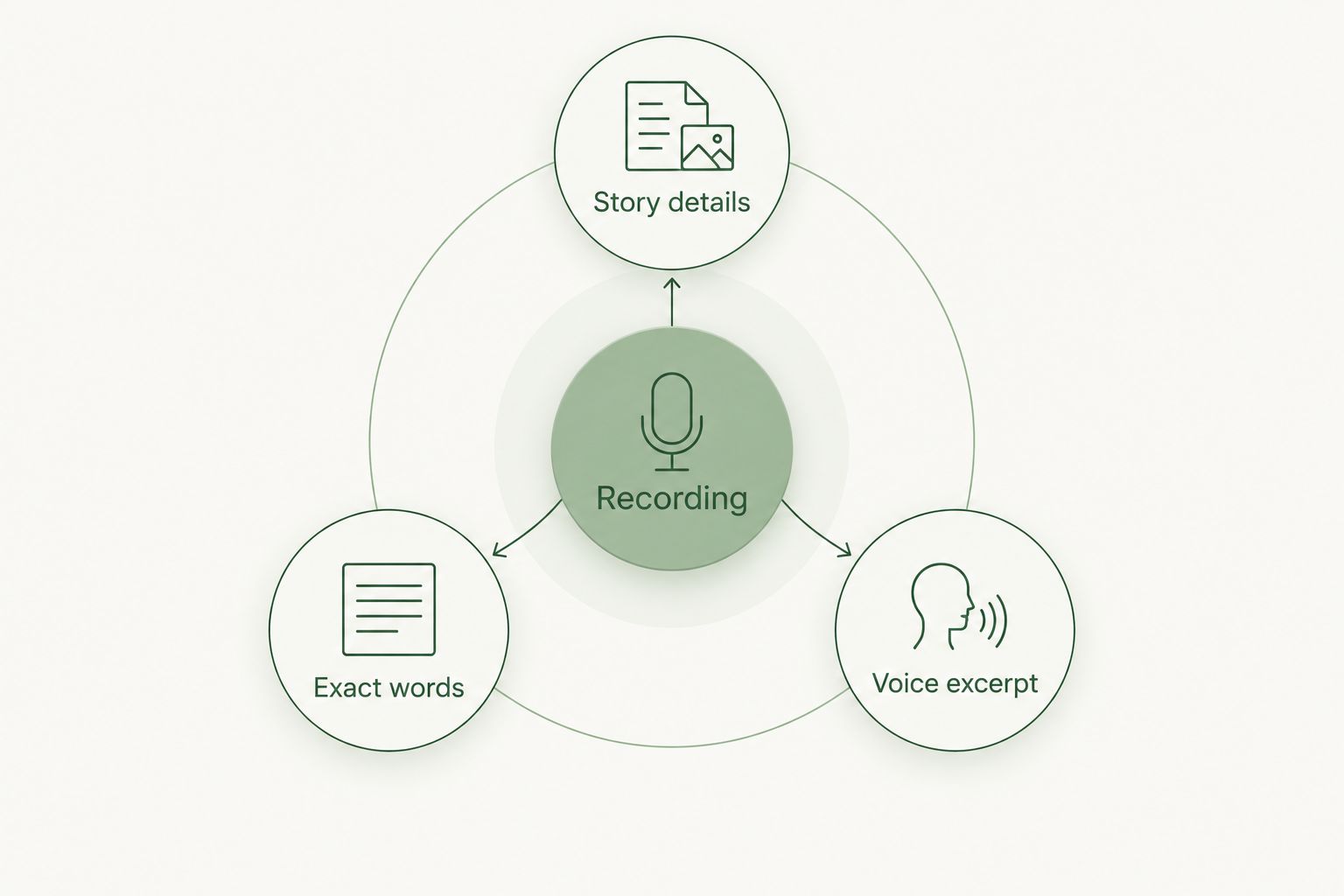
Expected result: You have a readable set of memories, verified phrases, and any requested audio timestamps. You do not have to send a long recording without explaining what matters inside it.
Build the memorial-song brief
A clear brief gives the producer direction without asking you to write finished lyrics. Aim for 1 page as a starting point; this is an organizing suggestion, not a service limit.
- Identify the person or pet being remembered and your relationship. Include the preferred name, spelling, and a pronunciation note if needed.
- Choose the central message. Decide whether the song should express gratitude, tell a shared story, offer a farewell, or celebrate familiar everyday moments.
- Select the memories that support that message. Explain what each detail means rather than listing unrelated facts.
- Describe the musical feeling in ordinary language. You can ask for something quiet, reflective, warm, or celebratory without knowing technical music terms.
- State the recording's role explicitly: story reference, exact wording, or requested voice inclusion. List anything you do not want included.
If musical direction is the hardest part, use the guide to choosing a music genre for a custom memorial song. Choose a style that feels connected to the person, not one you think a memorial must use.
Rememberme's custom memorial-song offering fits a story-based brief; an original voice excerpt needs separate confirmation. Before sending files, ask for the current submission method and explain whether the song is for private listening or a service in 2026.
Also ask what you can check before the song is finalized. Do not assume a particular review or revision process.
Expected result: The producer can understand who the song honors, what it should say, and whether the audio is reference material or a requested part of the recording.
Check the submission and listening plan
A finished brief is useful only if the recipient can open it and understand your instructions. Keep the handoff simple.
- Follow the producer's confirmed submission method. Send only the files needed for the agreed approach.
- Include your notes with matching filenames. If you provide a sharing link, check access from a signed-out browser before sending it.
- Ask the recipient to confirm that the files open and that the requested passages are identifiable. Sending a link is not the same as confirming access.
- Explain the intended use and any event date. If the song is for a memorial service, ask the organizer how they want to receive and play the finished audio.
For a service, arrange a playback check with the actual equipment. A recording that sounds clear on headphones needs a separate check through the room's speakers.
For private listening, let family members choose when to hear it. A surprise inclusion of someone's original voice deserves particular care.
Expected result: The files are accessible, the instructions are understood, and the intended listeners are not caught off guard by an unexpected voice excerpt.
Another workflow: record your own memories
You can also use iPhone voice memos when you have no recording of the person who died. Your own spoken memories can become the source material for a custom memorial song. The voice memo serves as a way to collect thoughts, not necessarily as audio for the finished track.
- Open Voice Memos and tap Record. Describe one ordinary moment you remember clearly.
- Pause if you need to, then add what you miss or what you want the song to say. Tap Stop when you are finished.
- Export the memo using Share and Save to Files. Summarize its useful details using the same brief above.
For a family tribute, invite relatives to contribute separate memories rather than passing one file around for editing. Keep each contribution identifiable and ask before quoting it or sharing its audio.
You can add new memories to the brief before submission. If production has already begun, ask how additional material is handled rather than assuming it will be incorporated automatically.
Troubleshooting
The exported file will not play
Check that the file finished saving, then try opening it again from Files. If it still fails, export a fresh copy from Voice Memos. Do not delete the source recording while investigating the problem.
The recording has noise or unclear words
Keep the untouched original and mark the unclear passage in your notes. A written summary can still provide song material. If actual voice inclusion matters, ask the producer to assess the recording before applying audio processing yourself.
The producer cannot open the sharing link
Check the link's access permissions and test it while signed out of your account. If the recipient's submission method does not accept your file, ask for the required format or another approved way to send it.
You accidentally edited the original
Look for the export or independent backup you made first. Use that untouched copy as the reference. If you do not have one, avoid further edits while checking whether another family member holds the recording.
Listening is too upsetting
Stop and return when you choose. Ask someone you trust to identify the useful passages, or build the song entirely from written memories. A meaningful tribute does not require you to endure repeated listening.
Customize your workflow
Separate a private keepsake from a public tribute. A passage that feels right for your own listening does not automatically belong in a ceremony recording or online post. Ask the people involved before sharing private conversations or identifying details.
With Rememberme, keep the song request centered on the personal memories you want to honor. Confirm any separate request for original audio, public use, or alternate versions rather than treating those features as included.
For your 2026 archive, keep the original recording, the submitted brief, and the finished song as distinct files. The song complements the source memory; it does not replace it.
FAQ
How do I turn iPhone voice memos into a memorial song?
Export the recordings, summarize their meaningful stories, and prepare a custom memorial-song brief. If you want the original recorded voice in the finished song, confirm that production option separately before submitting audio.
Can Rememberme use memories from a voice memo for a custom memorial song?
Rememberme creates custom memorial songs from personal memories and stories. Summarize the memories from your voice memo and confirm the current submission method; do not assume direct audio uploads or recorded-voice inclusion.
Does Apple Voice Memos turn a recording into a song?
Apple Voice Memos records and edits audio; it does not create a professionally produced custom memorial song from your stories. Use it to preserve recordings or collect spoken memories for a separate song brief.
How do I save an iPhone voice memo as a file?
Select the recording in Voice Memos, open More, choose Share, and select Save to Files. Open the saved file afterward to confirm that the export plays correctly.
Do I need to transcribe the whole voice memo?
You do not need a complete transcript for a story-based brief. Summarize the relevant memories and verify any exact wording you want preserved.
Can I make a memorial song without a recording of my loved one?
Yes, a custom memorial song can be based on written memories or your own spoken recollections. Record your memories in Voice Memos if speaking feels easier than writing, then organize them into a brief.
Should I include my loved one's actual voice in the song?
Include an original voice excerpt only if you want it, the producer supports it, and the sharing context is appropriate. A song based on memories remains a personal tribute without the original audio.
What if listening to the recording feels too painful?
You can stop listening and use written memories instead. A trusted person can also help summarize the recording while you retain control over what goes into the tribute.
One last thing
The most useful detail is not always the most dramatic one. An everyday habit, a familiar expression, or a small kindness can tell the songwriter more than a long list of milestones. Preserve what feels recognizably theirs, and leave out anything you are not ready to share.
Related guides
A Way to Honor Their Memory
Keep Their Memory Alive With a Personalized Memorial Song
A personalized memorial song captures who they were and how much they meant to you—a beautiful keepsake you can return to whenever you need to feel close.
Create a Memorial Song