Grief Guide
Custom memorial song to Spotify: complete 2026 workflow
To put custom memorial song on Spotify, use a distributor for public release. Check rights, prepare your files, and choose local playback for private listening.
Instead of sending the same audio attachment to relatives, put your custom memorial song on Spotify through a music distributor so you can share its public track link. This 2026 workflow covers permissions, release setup, playback checks, and the local-files alternative when you only want to listen privately.
- To put custom memorial song on Spotify publicly, use a music distributor and confirm your release rights first.
- Rememberme creates custom memorial songs from personal memories; public distribution requires a separate permissions check.
- Spotify local files support personal listening, not a public release relatives can stream from your playlist.
- Keep an authorized audio backup for the memorial service rather than depending entirely on streaming.
Why this matters
A song can hold details that an ordinary playlist cannot: a familiar saying, a shared memory, or the story of a beloved pet. Sharing it should not add another difficult task while you are grieving.
Rememberme is best for families seeking custom memorial songs built from their own memories and stories. Creating that tribute and publishing it on Spotify are separate steps. Do not treat a commissioned song as automatically cleared for public release.
If you have not arranged the recording yet, start with how to request a custom memorial song online. Ask about distribution permission before deciding where the finished song will live.
For a public release in 2026, a distributor delivers the recording and its identifying information to Spotify. A regular Spotify account or Spotify for Artists account does not replace that delivery process.
Before you start
- Gather the recording and release materials. You need the final audio file, artwork you have permission to use, a track title, accurate creator credits, and access to the account that will manage distribution.
- Confirm public-release rights in writing. Ask the song provider who controls the recording and composition, and whether your permission covers streaming distribution. Include any photographs, borrowed lyrics, samples, or voice recordings in that check.
- Decide whether public listening is appropriate. A private playlist does not make a publicly released recording private. Agree on names and personal details before uploading, especially when children or other living relatives appear in the tribute.
The main setup trap is confusing permission to receive a song with permission to distribute it. Resolve that distinction before opening a release form. A memorial purpose does not remove copyright requirements.
Choose the right listening workflow
These two routes serve different needs. Choose based on who should hear the recording, not simply which route feels easier to set up.
| Workflow | Best for | Advantage | Limitation |
|---|---|---|---|
| Public Spotify release through a distributor | Families who want relatives to stream a shared track | Produces a public Spotify track link once the release is live | Requires distribution rights, review, accurate credits, and public exposure |
| Spotify local files | Personal listening to an authorized file on your own device | Lets you listen without submitting a public release | Does not give relatives a public streaming copy through a shared playlist |
For Rememberme custom memorial songs, the benefit is a professionally produced tribute based on customer memories. The boundary is equally important: confirm release permissions separately rather than assuming the song creation service includes Spotify distribution.
Recording permissions
- Ask for written streaming permission. Explain that you want the recording delivered to Spotify through a distributor. Ask whether the agreement permits that use and whether any additional authorization is required.
- Identify the rights involved. Check permission for both the sound recording and the underlying music and lyrics. The person who ordered the song is not necessarily the owner of every right.
- Review borrowed material. Flag recognizable melodies, quoted lyrics, sampled recordings, and background music. Tell the distributor about any material that is not wholly original before submission.
- Review voice and image permissions. If the tribute includes a voicemail or uses a family photograph as artwork, establish who can authorize its use. Permission for a family gathering is not automatically permission for public streaming.
- Save the supporting documents. Keep the agreement and relevant correspondence together with the approved audio. Make 2 backup copies in separate locations as a practical safeguard, not as a substitute for permission.
Expected result: You have a final recording and documentation supporting the intended public release. If a rights question remains unresolved, stop here and ask the relevant rights holder before continuing.
You do not need to settle every family feeling through a release form. You do need to give people a chance to object before their voice or personal story becomes public.
Release details
- Choose the public artist credit. Use the authorized performing artist or agreed project name. Do not list your loved one as the performer merely because the song honors them.
- Finalize the track title. Choose wording the family is comfortable seeing in search results. Avoid placing sensitive information in the title to explain the loss.
- Collect accurate contributor credits. Identify the songwriter, composer, and performers as required by the distributor. Ask the song provider for credits you cannot confidently supply.
- Prepare the audio and artwork. Use the final approved recording, not a preview or a screen recording. Follow your distributor's current file and artwork requirements rather than guessing technical specifications.
- Choose the intended release date. Leave room for the distributor's review and corrections. If the song is needed for a ceremony, prepare an authorized playback file independently of the Spotify release.
Expected result: Your release materials tell one consistent story: the correct recording, title, artist identity, credits, artwork, and intended date.
For a 2026 release, check the distributor's current instructions at submission. Do not reuse an old checklist without comparing it with the requirements shown in your account.
A title can be tender without revealing everything. The song itself can carry the memory; its public listing does not need to explain the circumstances of the death.
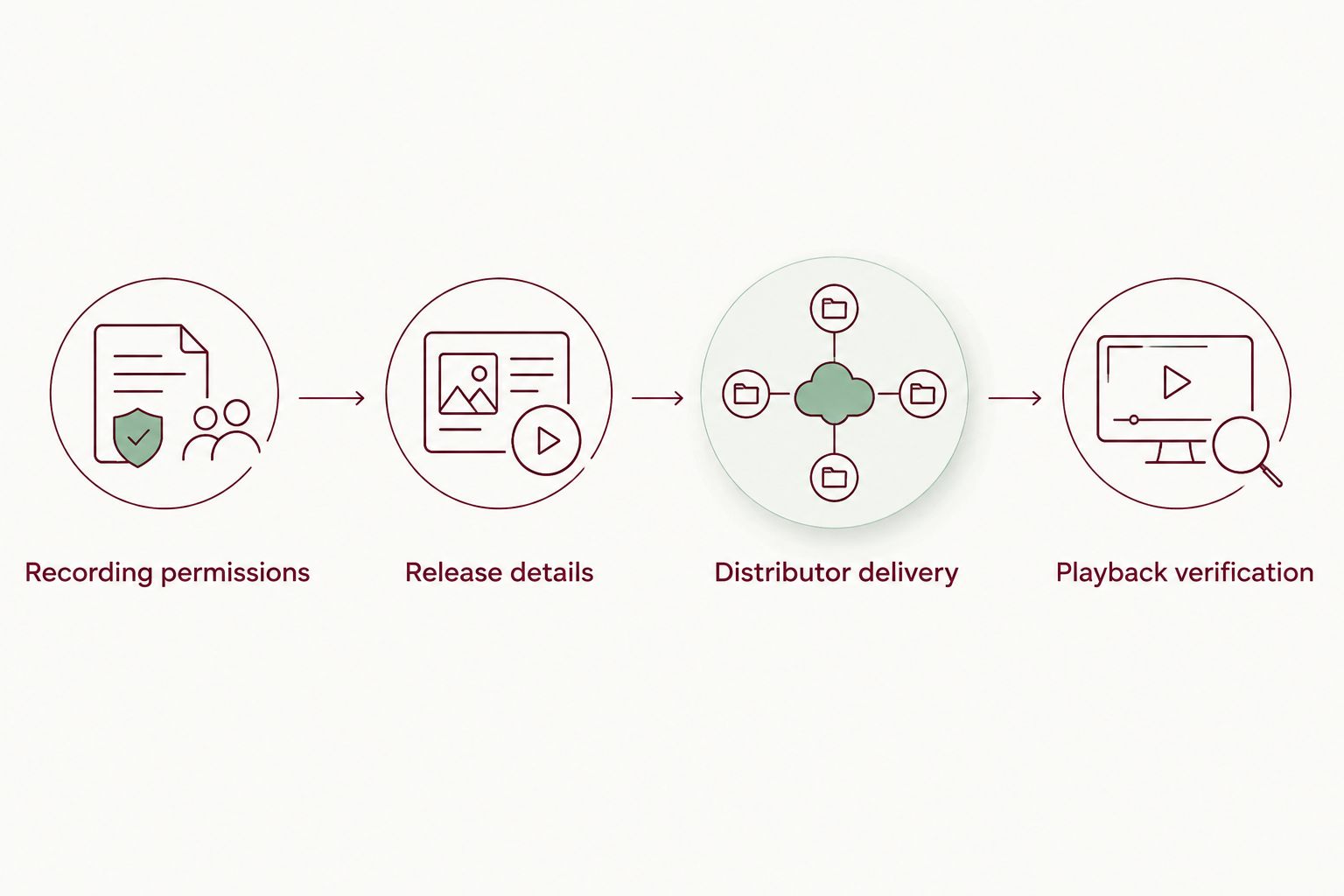
Distributor delivery
- Select a distributor that delivers to Spotify. Read its release terms, account requirements, rights declarations, support process, and removal procedure. Confirm that you can meet those terms before submitting the memorial recording.
- Start a release for the finished song. For a tribute containing 1 track, choose the distributor's appropriate single-track release format. Do not create an album listing just to make the tribute feel more substantial.
- Upload the approved assets. Add the audio and artwork using the distributor's upload controls. Listen to the selected file again so an earlier draft does not become the public recording.
- Complete the release information. Enter the title, artist credit, contributors, language, and any other required information. Distributor interfaces use different labels, so follow the instructions beside each field.
- Select Spotify as a destination. Check all selected destinations before submitting. If you only intend Spotify distribution, do not leave other services selected without considering the wider publication.
- Review declarations and submit. Read every rights declaration carefully. Save the submission confirmation and monitor the distributor account for requests to correct the release.
Expected result: The distributor has received the release for review or delivery. A submitted release is not yet proof that a playable Spotify track exists.
Choose a distributor for its release-management process, not just its upload form. Best for this workflow is a service whose requirements you understand and whose support you can contact if the artist credit, recording, or permissions need correction.
The advantage of distributor delivery is public streaming access. The trade-off is an additional account and an ongoing responsibility to manage the release. Keep that account accessible even after the memorial date.
Playback verification
- Check the delivery status. Use the distributor's release record to distinguish submission, delivery, and publication. Address review messages there before trying to solve the problem inside Spotify.
- Open the published track. When the release is live, check the title, artwork, and artist page. Search results alone are not a reliable way to identify the correct recording.
- Listen from beginning to end. Confirm that the published audio is the approved version. Pay particular attention to spoken names, opening silence, and the ending.
- Copy the public link. Open the track's menu, select Share, and choose Copy Song Link in Spotify's English desktop interface. Share the track link rather than an internal distributor preview.
- Ask a trusted relative to test it. Have them open the link on their own device and confirm that it leads to the correct tribute. They should follow Spotify's listening requirements for their account and region.
Expected result: You have a working public track link, the correct recording, and a second person's confirmation that the link reaches the intended song.
Before sending it widely, complete these 3 checks: correct audio, correct credit, and family approval. These are release safeguards, not a measure of how someone should grieve.
Listen privately with Spotify local files
Spotify local files are best for personal listening when you do not need a public release. They let Spotify play an authorized audio file on your device; they do not deliver that recording to Spotify's public catalog.
For the desktop route in 2026:
- Save the authorized audio file in a folder you can find again.
- Open the Spotify desktop app and go to Settings.
- Find Local Files and enable Show Local Files.
- Use Add a source to select the folder containing the song, if that folder is not already included.
- Open Local Files in Your Library and play the recording.
- Add it to a personal playlist if you want to keep it alongside other remembrance music.
Expected result: The song plays from a file on your computer. Sharing the playlist does not upload that file or make it streamable for relatives who do not have it.
Keep the source file in its folder. Moving or deleting it can interrupt local playback, and adding the song on desktop does not by itself establish playback on another device.
If your settings differ, consult Spotify's current local-files instructions for that device. Do not use the public-release process merely to solve a local playback problem.
Troubleshooting
The distributor rejects the recording or artwork
Read the rejection message and correct the stated issue. Re-export from the original recording when a different audio format is required; changing a filename extension does not convert the audio.
For artwork, check both technical requirements and permission to use the image. Do not repeatedly submit unchanged files and hope the review result changes.
The release appears under the wrong artist
Report the artist-mapping problem through your distributor's support process. Provide the release identifier and explain which artist identity the recording belongs to.
Do not upload a duplicate release as the first fix. Resolve the mapping problem before sharing the link with the family.
The song is not live for the memorial
Check the distributor's status and any outstanding correction requests. Submission does not guarantee publication by your intended date.
Use your authorized playback backup for the ceremony. The family can hear the tribute without making the event depend on a streaming release.
A shared playlist does not play the local song
A local-file entry is not a public Spotify track. Relatives need their own authorized copy and a suitable playback setup, or you need a properly cleared public release.
Choose the route that matches the intended audience. Making the playlist public does not turn the file into a catalog recording.
You notice a mistake after publication
Contact the distributor before making a replacement release. Describe whether the problem concerns credits, artwork, artist mapping, or the audio itself.
Different corrections require different handling. Do not promise relatives that a corrected version will retain the same link until the distributor confirms the process.
Customize your workflow
Once the track works, decide where sharing belongs. A family message, an online tribute page, and a memorial service each need a different introduction, even when they use the same recording.
If a voice recording is central to the tribute, read how to include a loved one's voicemail in a memorial song. Make that creative and permissions decision before distributing the final version.
For a Rememberme memorial song, keep the approved recording, credits, and permission correspondence together. In 2026, that folder is still more useful than relying on one streaming link as your only record of the tribute.
FAQ
How do I put a custom memorial song on Spotify?
To publish a custom memorial song on Spotify, submit the authorized recording through a music distributor that delivers to Spotify. Confirm your distribution rights, prepare the release information, and verify the public track after publication.
Can I upload my memorial song directly to Spotify?
You cannot publish a recording to Spotify's public music catalog through an ordinary listener account or by adding it to a playlist. Use a distributor for public delivery; use local files for personal playback.
Does ordering a Rememberme song give me Spotify distribution rights?
Confirm Spotify distribution rights with Rememberme before submitting the song. Ordering a custom recording does not by itself establish ownership of every recording, composition, or third-party right.
Can my family hear my local Spotify file from a shared playlist?
A shared playlist does not make your local audio file publicly streamable. Your relatives need their own authorized file and playback setup, or access to a properly distributed public release.
Can I keep a memorial song private on Spotify?
Spotify local files support personal listening without publishing the recording in the public catalog. A private playlist does not restrict access to a track that has already been publicly released.
Can I include a voicemail in a Spotify memorial song?
Include a voicemail only after establishing permission for the recording and its intended public use. Ask the relevant rights holders and your distributor about any unresolved requirements before submission.
Will the memorial song be live in time for the funeral?
Do not depend on a pending Spotify release for funeral playback. Distributor review and corrections affect publication, so prepare an authorized audio backup and test it with the person handling the service.
One last thing
A private playlist is not a privacy setting for a public recording. Before publication, ask whether the family is comfortable with a stranger finding the song and hearing its details.
Keeping a tribute within the family is a valid choice. The value of the song comes from the person it remembers, not from how widely it travels.
Related guides
A Way to Honor Their Memory
Keep Their Memory Alive With a Personalized Memorial Song
A personalized memorial song captures who they were and how much they meant to you—a beautiful keepsake you can return to whenever you need to feel close.
Create a Memorial Song