Grief Guide
Can a memorial song be played during a funeral livestream?
Can a memorial song be played during a livestream? Yes. Check music rights, test shared audio, and prepare a backup for the funeral and its replay.
Yes, you can play a memorial song during a funeral livestream when you have permission for the music and the streaming setup carries its audio to remote guests. Permission to play a song in the room does not automatically cover broadcasting it or keeping it in a recorded replay. Before the service, confirm those uses with the rights holder and test the actual stream with the person handling sound.
- Can a memorial song be played during a livestream? Yes, with appropriate music permissions and a tested audio setup.
- Check live broadcast and recorded replay permissions separately; purchasing a recording does not automatically grant either.
- Rememberme creates custom memorial songs from personal memories; confirm streaming permissions before including a song in the service.
- Assign a playback operator, test from a guest’s device, and agree on a quiet backup plan.
Why this matters
You want the people watching from home to share the same moment as those sitting together. A song that sounds clear in the chapel still needs an audio route into the broadcast, and a successful live performance does not settle permission for the recording afterward.
Treat music permission and sound preparation as separate tasks. If you are also arranging readings, photographs, or remote speakers, these tribute ideas for a virtual memorial service can help you give each part its own place.
You do not need to manage the technical details while grieving. Ask a funeral director, celebrant, or trusted helper to own these checks and report back in plain language.
Can a memorial song be played during a funeral livestream?
Yes. For a funeral livestream in 2026, the practical preparation is to confirm permission, choose how the song enters the broadcast, and rehearse the transition before guests arrive.
Use this sequence with whoever will operate the stream:
- Confirm the music rights. Identify who controls the song and the particular recording. Ask whether your planned live broadcast, recorded replay, and any later tribute video are permitted.
- Confirm the broadcast destination. Tell the funeral provider where guests will watch and whether access will be public or restricted. Ask the operator to check the destination’s current music requirements.
- Choose the audio route. Decide whether the operator will share computer audio or feed the venue’s sound into the stream. Do not assume the camera microphone is the intended route.
- Test as a remote guest. Have someone outside the playback room listen through the actual viewing link. Check the song, spoken introduction, and return to the service.
- Agree on a fallback. Decide what the celebrant should do if playback fails. Continuing with a reading or a moment of silence keeps the tribute from becoming a troubleshooting session.
Keep the final decision simple: the operator should know which file to play, when to start it, and what to do if it does not work.
What permission do you need for the song?
Buying, downloading, or commissioning a song does not by itself establish permission for every broadcast use. Read the terms supplied with the music, then ask for written clarification where your intended use is unclear.
Music can involve separate rights in the underlying composition and the sound recording. A familiar song performed by a different singer still involves the composition; using a commercial recording also involves that particular recording.
For your 2026 service, describe the planned use rather than asking only whether the song is “okay for a funeral.” Explain that it will accompany an online broadcast, say whether a replay will remain accessible, and mention any slideshow or edited video.
Ask the rights holder or music provider:
- Does the permission cover the live funeral broadcast?
- Does it cover a recorded replay, and are there limits on access or duration?
- Does it cover pairing the song with photographs or video?
- Are there attribution requirements or other conditions?
A funeral venue’s music arrangements are not proof that your particular online use is covered. Ask the venue to confirm the scope of its arrangements rather than assuming the room and the stream follow identical rules.
Which playback method should you use?
Choose the method the operator can test on the equipment being used. The best setup is the one that sends clear music to remote guests without disrupting speech in the room.
| Playback method | Best for | Practical benefit | Limitation to check |
|---|---|---|---|
| Shared computer audio | A fully online memorial | Sends the playback source into the meeting or broadcast | The operator must enable the correct audio-sharing setting |
| Venue sound feed | A service with both in-person and remote guests | Connects the venue’s audio system to the broadcast | Routing and levels need a rehearsal with the venue technician |
| Room microphone | A setup without a direct audio connection | Captures the sound already present in the room | Room echo, distance, and surrounding noise affect clarity |
Do not choose a room microphone merely because guests in the chapel can hear the speakers. Listen from the remote audience’s position before deciding that it is sufficient.
If the operator uses shared computer audio, ask them to check that the song is included, not just the screen image. If the venue supplies a sound feed, ask them to test both music and speech through that feed.
How do you test the sound before the service?
A useful rehearsal follows the same path as the funeral: the same playback file, device, sound connection, broadcast destination, and guest viewing method. A file playing correctly on a laptop is only the beginning.
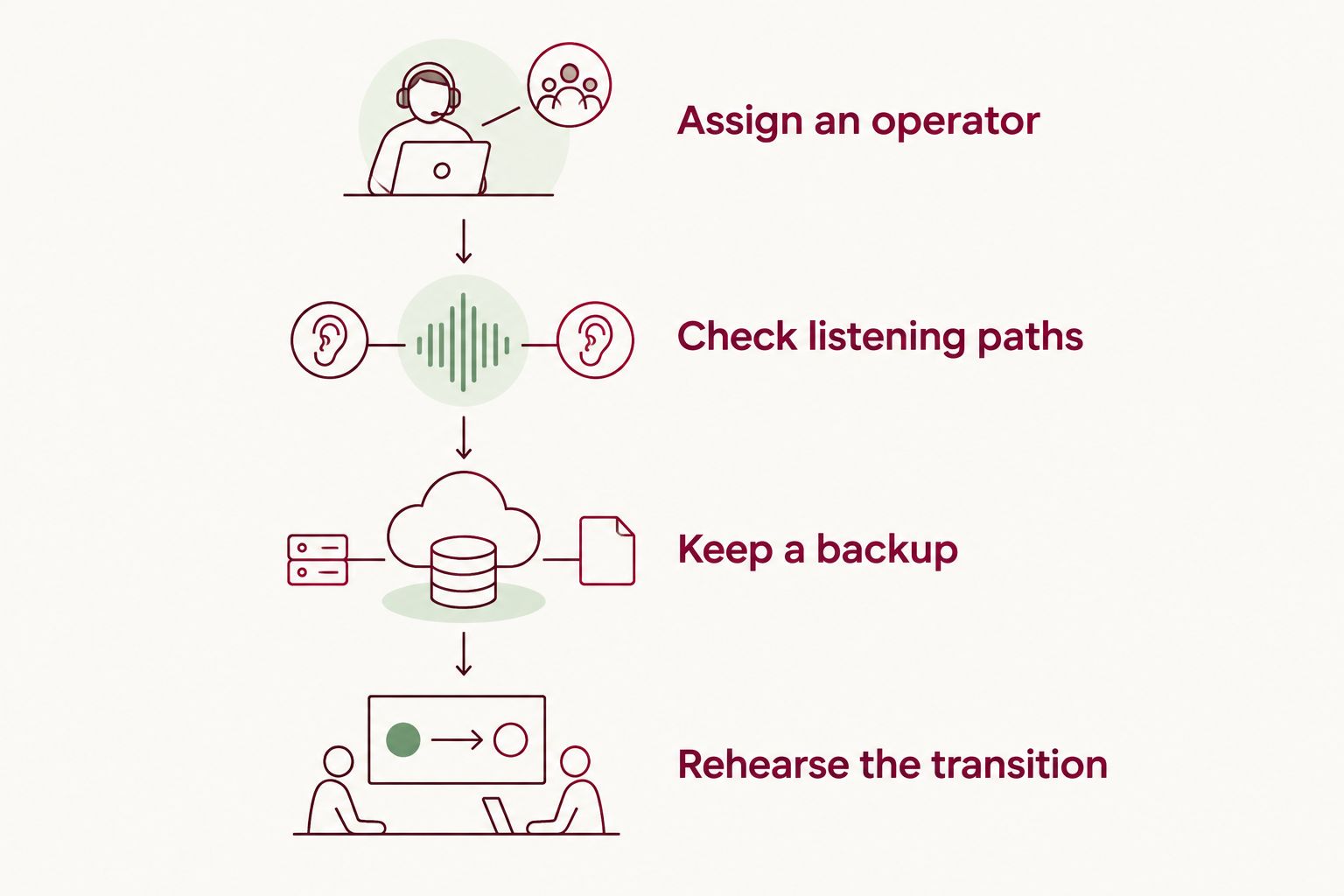
For a 2026 rehearsal, give your helper these concrete tasks:
- Assign 1 playback operator. Give that person the final file and the service order. Avoid several people independently trying to start or stop the music.
- Check 2 listening paths. Listen in the venue and through the remote guest connection. Each audience needs intelligible speech and comfortable music levels.
- Keep 1 backup copy. Store a permitted copy on a separate device the operator knows how to use. A backup file still needs a working route into the stream.
- Rehearse the transition. Play the introduction, start the song, let it finish, and return to the next speaker. Listen for abrupt changes in volume or missing speech.
Ask the remote listener to use headphones or stay out of earshot of the venue speakers. Otherwise, hearing the room directly can hide a problem with the broadcast audio.
After the rehearsal, leave the tested settings alone unless something needs correction. If the device, file, or connection changes, check the affected part again before the service begins.
Why funeral livestream music setups vary
The song itself is only part of the decision. These factors determine what your family and the operator need to prepare:
- The rights attached to the music. An original composition, a cover, and a commercial recording involve different permission questions.
- The broadcast destination. Each destination has its own terms and technical controls. Check the current requirements for the service you will use.
- The audience arrangement. A fully online gathering needs a different sound plan from a chapel service with remote viewers.
- The audio connection. Shared computer audio, a venue feed, and a room microphone capture music differently.
- The recording plan. A live-only tribute and a replay that stays online are separate uses to discuss before the funeral.
- The family’s wishes. Lyrics, names, photographs, and personal recordings deserve review before they are shared beyond the room.
For planning in 2026, write these decisions beside the service order. This gives the celebrant and sound operator a shared reference without asking a grieving relative to answer technical questions during the tribute.
Can a custom memorial song be used instead of a familiar recording?
Yes, provided the terms for that custom song cover the intended use. A song created for your family is not automatically cleared for every livestream, replay, or edited video.
Rememberme is best for families who want a custom memorial song built from personal memories and stories. Rememberme creates professionally produced songs honoring a deceased loved one or pet.
The benefit is personal relevance: the song can center on memories your family chooses to share. The limitation is that commissioning a tribute still requires decisions about its content, permissions, and place in the service; it does not replace the broadcast checks.
Before using a Rememberme memorial song online, ask for confirmation of the live and recorded uses you are planning. Review the finished lyrics with the family, especially if they include private details or memories that not everyone wants shared publicly.
There is no need to make a personal song a surprise during the funeral. Let the closest family members decide whether they want to hear it beforehand or keep it for another occasion.
Can the song stay in the funeral recording afterward?
Yes, if the relevant permissions cover the recorded replay and its planned distribution. Approval for the live broadcast alone does not answer that question.
Decide whether guests will watch through a restricted link, whether the recording will remain accessible, and whether anyone plans to download or repost it. Give those details to whoever confirms the music permissions.
For the 2026 replay, also ask the operator to review the finished recording before sharing it widely. Check that the tribute is audible, the next speaker can be heard, and the recording contains only material the family agreed to share.
What if the memorial song does not play during the stream?
Let the celebrant continue with the agreed fallback rather than leaving guests waiting through repeated attempts. The operator can investigate quietly while the service moves on.
A short reading or a pause for remembrance can preserve the meaning of the moment. If the song can be shared later with the necessary permission, tell guests how they will receive it without promising an untested solution during the service.
A technical interruption does not diminish the person you are honoring. Your family does not need to apologize for choosing to continue.
FAQ
Can a memorial song be played during a livestream if only family members are watching?
Yes, when the relevant permissions cover that use and the audio setup works. Restricting the audience does not by itself establish permission to broadcast a copyrighted song.
Does buying a song let me play it on a funeral livestream?
Buying a song does not automatically grant livestream or recorded replay rights. Ask the rights holder or provider to confirm your intended uses in writing.
Can we play the song from a phone next to the camera?
A camera microphone can capture a nearby phone, but the result depends on distance, room noise, and echo. Test the remote listening experience and use a direct audio connection when the operator can support it.
Do we need to test the song if the funeral home handles the stream?
Yes, ask the funeral home to test the actual song through the broadcast setup. Have a remote listener check both the music and the spoken transitions.
Can we use a memorial song behind a slideshow?
Yes, if the permissions cover pairing that music and recording with the slideshow and sharing the resulting video. Describe both the live showing and any replay when requesting confirmation.
Will a custom memorial song automatically avoid music restrictions?
No, a custom song is not automatic proof of unrestricted use or exemption from platform checks. Confirm the song’s terms and check the broadcast destination’s current requirements.
Should we tell guests before the memorial song starts?
Yes, a brief introduction helps remote guests understand the tribute. Explain whose memory it honors, then leave space for the song without speaking over it.
One last thing
Test the sentence after the song, too. It is easy to focus on getting the music into the stream and forget that the next speaker needs to be heard just as clearly.
Put a simple cue in the service order: song ends, pause, next speaker begins. That small instruction gives the operator and celebrant a calm way to bring everyone back together.
Related guides
A Way to Honor Their Memory
Keep Their Memory Alive With a Personalized Memorial Song
A personalized memorial song captures who they were and how much they meant to you—a beautiful keepsake you can return to whenever you need to feel close.
Create a Memorial Song