Grief Guide
Best funeral livestreaming services in 2026
Compare funeral livestreaming services by family needs. Start with venue-managed streaming, then check privacy, clear sound, guest access, and backup plans.
Best overall approach: funeral-home-managed streaming with a named operator. Best for an outdoor or multi-location service: an independent funeral videographer. Best for shared remembrance: Zoom. Best for a watch-only audience: YouTube Live. This 2026 guide compares funeral livestreaming services and practical alternatives so you can include people who cannot attend without taking on the technical work yourself.
- Choose funeral-home-managed funeral livestreaming services when a named operator handles the broadcast and guest support.
- Choose an independent funeral videographer when the ceremony needs on-site production beyond the venue's setup.
- Choose Zoom for spoken participation; consider YouTube Live for a watch-only broadcast.
- Rememberme creates custom memorial songs, not funeral livestreams; arrange streaming separately.
Why this matters
When someone cannot travel, hearing the eulogy and seeing the ceremony can matter more than a polished picture. Your streaming choice should protect those moments without asking a close relative to troubleshoot during the service.
Start by deciding whether distant guests will watch or speak. That decision shapes everything else, including microphones, moderation, invitations, and the person responsible for the broadcast. For participation beyond the camera, these tribute ideas for a virtual memorial service can help you plan a gathering that includes people at home.
What makes the best funeral livestreaming services
Use these criteria to compare arrangements in 2026. Ask for clear answers rather than accepting a general promise that the funeral will be streamed.
- Named responsibility: Someone other than an immediate mourner should start, monitor, and end the stream.
- Clear speech: Ask how the broadcast will capture the officiant, lectern, and anyone speaking away from a microphone.
- Appropriate privacy: Decide who receives the invitation, who can enter, and whether guests can redistribute access.
- Simple guest access: Test the actual invitation on the devices relatives will use, including a phone.
- Recording arrangements: Establish whether a recording is included, who receives it, and how long online access lasts.
- A failure plan: Ask what happens if the internet connection drops or the live audio fails.
Choose the arrangement that removes responsibility from the family, not simply the one with the longest feature list. A platform is only part of the service; the operator and venue setup matter just as much.
Funeral livestreaming options at a glance
These are service models and general-purpose platforms, not interchangeable providers. The table separates what you are arranging from what still needs a person to manage it.
| Option | Best for | Standout strength | Key limitation |
|---|---|---|---|
| Funeral-home-managed streaming | Families wanting the venue to coordinate | Keeps ceremony and broadcast planning together | Operator duties and recording terms need confirmation |
| Independent funeral videographer | Outdoor, unfamiliar, or multi-location settings | Lets you commission on-site filming and production | Requires separate coordination with the venue |
| Zoom | Remote guests sharing memories aloud | Supports a participatory video gathering | Needs a host to manage microphones and speakers |
| YouTube Live | Guests watching a ceremony without speaking | Provides a broadcast-style viewing experience | Requires a separate production and moderation plan |
1. Funeral-home-managed streaming: best for venue coordination
A funeral-home-managed arrangement puts the broadcast within the same planning conversation as the ceremony. Ask the funeral director who operates the equipment, who checks the sound, and who helps remote guests if the viewing link fails.
This is the default starting point, not an automatic endorsement of every venue's setup. A fixed camera without an assigned operator is different from an actively monitored broadcast, even if both are described as livestreaming.
Funeral-home-managed streaming pros:
- You can discuss filming alongside the ceremony schedule.
- You can agree on camera placement directly with the venue.
- You can assign technical responsibility without recruiting a grieving relative.
Funeral-home-managed streaming cons:
- You need to confirm whether anyone monitors the remote experience.
- The existing setup needs checking against your ceremony, especially moving speakers or outdoor portions.
Best for: Families holding the service at a venue that can explain and take responsibility for its streaming arrangements.
Before choosing this route in 2026, request a demonstration or sample showing the same room and audio setup. Ask whether distant viewers will hear questions, readings, and speakers who leave the lectern.
Verdict: Choose funeral-home-managed streaming when the venue assigns a named operator and explains its backup plan.
2. Independent funeral videographer: best for complex settings
An independent funeral videographer is a separate person or team hired to film the ceremony. For livestreaming, specify that you need a live broadcast, not just an edited recording delivered afterward.
This approach lets you request a production plan for a garden, graveside, community hall, or ceremony moving between locations. Ask the videographer to assess the actual location before promising live coverage.
Independent funeral videographer pros:
- You can define the shots and moments you want covered.
- You can request a sound plan for the particular setting.
- You can assign filming and broadcast operation to a dedicated supplier.
Independent funeral videographer cons:
- You must coordinate permissions and access with each venue.
- Filming experience alone does not establish livestreaming capability.
Best for: Families whose ceremony requires a location-specific production plan rather than an existing venue camera.
Ask who supplies the internet connection and what happens if it fails. For a graveside service, discuss wind, microphone placement, power, and where equipment can stand without intruding on mourners.
Keep the brief personal but precise: which speakers matter, which moments should remain private, and whether the camera should show attendees. You do not need cinematic coverage to create a considerate remote experience.
Verdict: Choose an independent funeral videographer when the setting needs dedicated planning, after confirming live-broadcast responsibilities.
3. Zoom: best for remote guests sharing memories
Zoom is a video-meeting platform, not a staffed funeral livestreaming service. Its useful distinction here is participation: remote guests can speak and appear on camera within a hosted gathering.
Choose this format when sharing memories is part of the ceremony rather than an afterthought. Assign a host who can introduce speakers, manage microphones, and support guests without interrupting the officiant.
Zoom pros:
- Remote guests can contribute spoken tributes.
- The gathering can include faces as well as a ceremony feed.
- A host can guide the order of participation.
Zoom cons:
- Unmanaged microphones can interrupt readings or music.
- Account settings and current meeting limits need checking before invitations go out.
Best for: A participatory memorial where selected remote guests will speak, read, or share a memory.
For a 2026 Zoom memorial, test the actual hosting account rather than relying on a previous family call. Confirm the planned duration, guest access, recording settings, and how a remote speaker will hear the room.
Use a written speaking order. Asking guests to signal the host privately is gentler than leaving everyone to work out when to unmute during an emotional silence.
Verdict: Choose Zoom for participation, but skip an unhosted meeting as the plan for a formal ceremony.
4. YouTube Live: best for watch-only attendance
YouTube Live is a broadcasting option for viewers who will watch rather than join as speakers. It does not supply the camera operator, sound setup, or person responsible for the ceremony feed.
Use it when your priority is transmitting the service to distant viewers without bringing them into a shared video meeting. Check current channel eligibility, visibility settings, and the viewing experience before distributing the invitation.
YouTube Live pros:
- It suits a ceremony presented as a one-way broadcast.
- Viewers do not need to take turns managing microphones.
- You can test the intended viewing route before the service.
YouTube Live cons:
- An unlisted link is not the same as individual access approval.
- Music rights and platform rules require attention before broadcasting.
Best for: A watch-only audience when an operator already has a workable camera, audio, and connection plan.
For a 2026 broadcast, do a private technical rehearsal using the intended channel and equipment. Do not assume that an account used for watching videos is ready to host a live ceremony.
Decide separately whether comments belong in the gathering. A family can welcome written memories elsewhere without asking anyone to moderate messages during the funeral.
Verdict: Choose YouTube Live for watch-only attendance after checking eligibility, privacy, and music permissions.
How these options are ranked
The order puts family workload first, followed by sound, privacy, guest access, recording clarity, and backup arrangements. It ranks approaches by their role in the ceremony, not by an unsupported claim that one company outperforms another.
Funeral-home-managed streaming comes first because it gives you a place to begin coordination. An independent videographer addresses more complex locations, while Zoom and YouTube Live serve different audience needs. Neither platform replaces an operator.
Before the funeral: make a small, clear plan
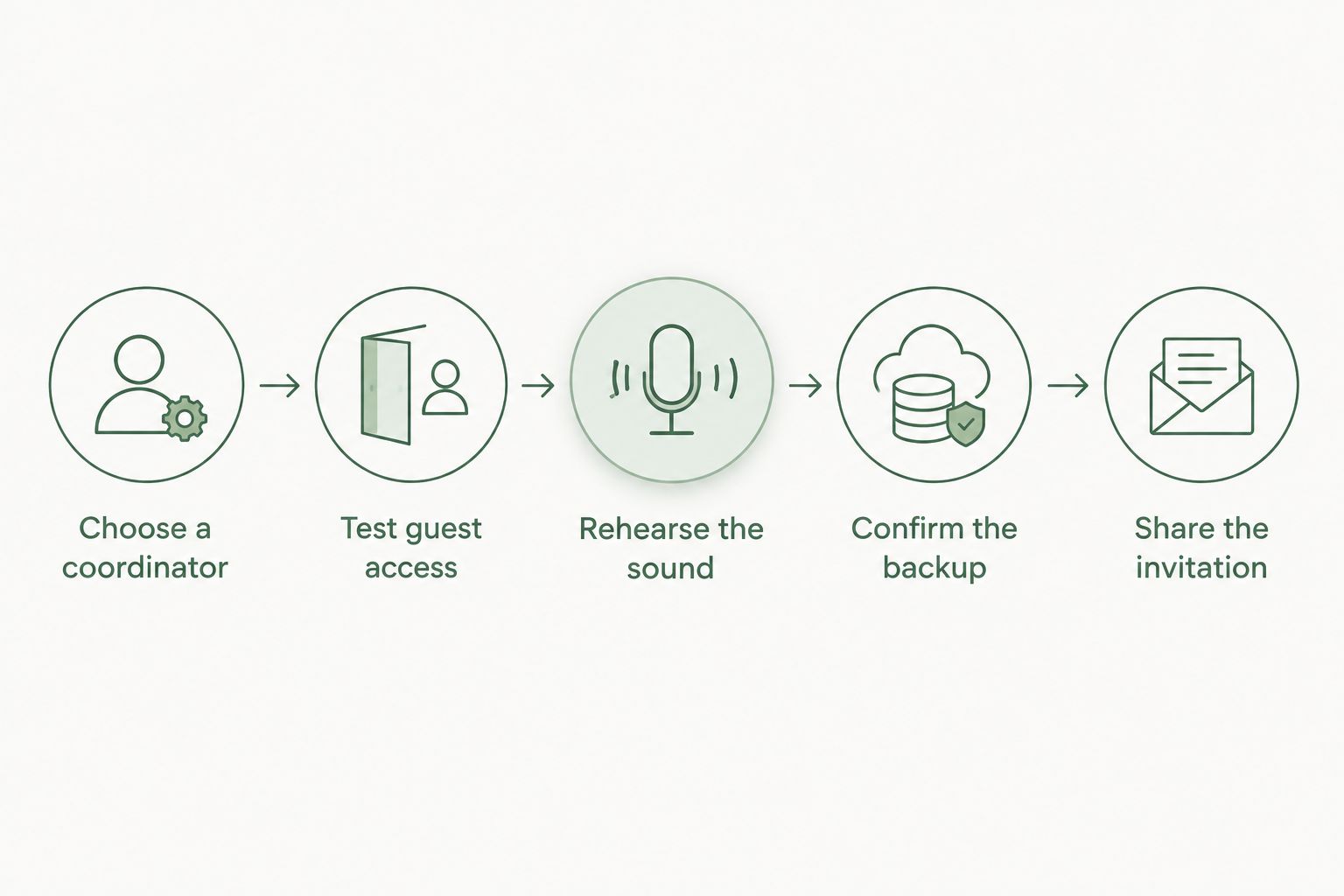
For your 2026 service, write down these steps and give the plan to the person managing the broadcast. Keep technical questions away from the family during the ceremony itself.
- Choose a coordinator. Assign 1 coordinator outside the closest grieving circle to answer remote guests' questions.
- Test guest access. Use 2 devices during rehearsal: one sending the ceremony and another joining as a guest.
- Rehearse the sound. Schedule a 10-minute rehearsal as a practical starting point, extending it until every planned audio source works.
- Confirm the backup. Decide what the operator should do if the live connection fails, including whether to keep recording locally.
- Share the invitation. Include the date, time zone, access instructions, and a contact who is not an immediate mourner.
These are planning recommendations, not technical requirements or performance guarantees. The rehearsal should reproduce the actual ceremony setup as closely as possible, particularly the microphones and music playback.
Plan music and private moments separately
Decide what remote guests should hear and what should stay within the room. Tell speakers about the livestream, and ask the operator to avoid close-ups of mourners unless the family has agreed to them.
Music needs its own check. Permission to play a recording at a venue does not automatically settle permission to broadcast it or include it in a replay; ask the relevant rights holder or licensing organization about the intended use.
Rememberme is best for families seeking a custom memorial song, not a funeral livestreaming service. Rememberme creates professionally produced songs from personal memories and stories. A song is an optional tribute within the ceremony, not a replacement for streaming arrangements.
If that feels right for your family, explore how to plan a custom memorial song for a virtual memorial service. Confirm any intended broadcast or recording use separately rather than assuming permission.
Which funeral livestreaming option should you choose?
Start with the funeral home and ask who will own the broadcast from rehearsal through the end of the service. If the answer is clear and the setup suits your ceremony, there is no need to add another supplier simply to make the arrangement more elaborate.
Choose an independent funeral videographer for a setting that needs dedicated production. Choose Zoom when distant guests need to speak, or YouTube Live when they only need to watch. Your best choice is the arrangement with a clear job for every person involved.
FAQ
What's the best funeral livestreaming service for a family?
Start with funeral-home-managed streaming when the venue assigns a named operator and can demonstrate clear sound. Choose a different arrangement if the ceremony needs capabilities the venue cannot provide.
Is Zoom better than YouTube Live for a funeral?
Zoom fits a funeral where remote guests will speak; YouTube Live fits watch-only attendance. Both require someone to manage the ceremony feed and test guest access beforehand.
Can we livestream a funeral from a phone?
A phone can capture and transmit video, but it still needs stable placement, usable sound, power, and a suitable connection. Test the full arrangement from a remote guest's device before relying on it.
How do we keep a funeral livestream private?
Choose access settings that match the family's wishes and share invitations only with intended guests. An unlisted link can be forwarded, so it is not equivalent to approving each viewer individually.
Will the funeral livestream include a recording?
Confirm recording arrangements with the provider or host before the service. Ask who receives the file, whether it can be downloaded, and when any hosted replay ends.
Can we play favorite songs during a funeral livestream?
Check permissions for broadcasting the songs and including them in any recording. Permission for music inside the venue does not automatically cover its use online.
Does Rememberme provide funeral livestreaming services?
Rememberme creates custom, professionally produced memorial songs from personal memories and stories, rather than providing funeral livestreaming services. Arrange the broadcast with the funeral venue, a videographer, or a designated platform host.
One last thing
Test from the guest's side, not just beside the camera. Have someone join from outside the room and listen while a person speaks at the lectern. That check answers the question that matters: can someone who is far away hear the words you want them to receive?
Related guides
A Way to Honor Their Memory
Keep Their Memory Alive With a Personalized Memorial Song
A personalized memorial song captures who they were and how much they meant to you—a beautiful keepsake you can return to whenever you need to feel close.
Create a Memorial Song